4 Java Environment
Learning objectives
- Understand the basic features of Java
- What are portability and robustness?
- Understand the concepts of bytecode and interpreter
- What is the JVM?
- Learn few coding conventions
4.1 Java Timeline
The Java language originated in 1991 and then continued evolving up to the present day.
- 1991: SunMicrosystems develops a programming language for cable TV set-top boxes
- Simple, OO, platform independent
- 1994: Java-based web browser (HotJava)
- The concept of “applet” appears
- 1996: First version of Java (1.0)
- 1996: Netscape supports Java
- Java 1.02 released,
- 1997: Java 1.1 released, major leap over for the language
- 1998: Java 2 platform (v. 1.2) released (libraries)
- 2000: J2SE 1.3
- platform enhancements
- HotSpot JVM
- 2002: J2SE 1.4 (several new APIs), e.g.
- XML
- Logging
- 2005: J2SE 5.0 (Language enhancements)
- Generics
- 2006: Java SE 6 (Faster Graphics),
- goes open source
- 2010: Acquisition by Oracle
- 2011: Java SE 7 (I/O improvements)
- 2014: Java SE 8 (Lang evolution, LTS)
- Lambda expressions
- Functional paradigm
- 2017: Java 9 released
- Modularization (Jigsaw),
- jshell (REPL)
- 2018: Java 10, Java 11 (LTS)
- Local var type inference
- 2019: Java 12, Java 13
- Switch expressions
- Text blocks
- 2020: Java 14, Java 15
- Text blocks
- 2021: Java 16, Java 17 (LTS)
- Records
- Jpackage
- 2022/23: Java 18, Java 19, Java 20
- Simple web server
- Virtual threads
- Latest release: Java 25(LTS) September 2025
- Compact Source Files and Instance Main Methods
For more details see: https://www.java.com/releases/
An exhaustive list of the changes introduced in each version is available here: https://docs.oracle.com/en/java/javase/25/language/java-language-changes-release.html.
Since Java 10 a new regular release process has been put in place with a well defined versioning scheme. A new version is released every six months (in March and September), update releases every quarter, and a long-term support (LTS) release every three years. LTS relesases are usually supported for eight years (e.g. JDK 25 will be supported until September 2033).
4.2 Java features
OO languages provide the constructs to support the development of code based on the Object-Oriented approach.
The Java constructs allow to define define classes (that constitute types) in a hierarchical way (using inheritance), create/destroy objects dynamically, send them messages (w/ dynamic binding). Java does not provide procedural constructs (it’s close to a pure OO language): there are no functions, class methods only, no global vars, class attributes only.
A summary of the key Java features follows:
- Platform independence (portability)
- Write once, run everywhere
- Translated to intermediate language (bytecode)
- Interpreted (with optimizations, i.e. JIT)
- High dynamicity
- Run time loading and linking
- Robust language, less error prone
- Strong type model and no explicit pointers
- Compile-time checks
- Run-time checks
- No array overflow
- Garbage collection
- No memory leaks
- Exceptions as a pervasive mechanism to check errors
- Shares many syntax elements w/ C++
- Learning curve is less steep for C/C++ programmers
- Quasi-pure OO language
- Only classes and objects (no functions, pointers, and so on)
- Basic types deviates from pure OO…
- Easy to use
- Supports “programming in the large”
- JavaDoc
- Class libraries (Packages)
- Lots of standard utilities included
- Concurrency (thread)
- Graphics (GUI) (library)
- Network programming (library)
- socket, RMI
- applet (client side programming)
4.2.1 Classes
Java has one first level concept: the class
The minimal syntactically correct code is:
public class First {
}
The source code of a class sits in a .java file having the same name, thus the above First class definition shall be placed in a file named First.java. The general rule is one file per class; it is enforced automatically by most IDEs. It is important to note that class-filename is a case-wise correspondence,they must match exactly.
4.2.2 Methods
In Java there are no functions, but only methods within classes. The syntax of methods is very similar to that of C functions although they are defined within the scope of a class and work in the context of objects.
The execution of a Java program starts from a special method:
public static void main(String[] args){ ... }Please note the differences w.r.t. C
- return type is
void, - there is not
argcargument, - the
argsargument correspond the the Cargvbut, notably,args[0]is the first parameter on the command line (not the program name).
Since Java 25 it is possible to omit the public static part, provided the class has a public constructor without pararameters, thus having a launchable main method.
4.3 Java Ecosystem
The Java Ecosystem is made up of
- Java language
- Java platform
- Java Virtual Machine (JVM)
- Class libraries (API)
- Software Development Kit (SDK)
The Java SE SDK (e.g. version 25) includes:
javaccompilerjdbdebugger- JRE (Java Run Time Environment)
javaJVM- Native packages (awt, swing, system, etc)
- Docs, i.e., https://docs.oracle.com/en/java/javase/25
Usually the development is performed using an Integrated development environment (IDE).
To prepare a complete developmente environment the following must be installed:
JDK (25.0)
You can install any distribution, e.g.:
- https://docs.aws.amazon.com/corretto/latest/corretto-25-ug/downloads-list.html
- https://adoptium.net/en-GB/temurin/archive/?version=25
- https://www.azul.com/downloads/?version=java-25-lts&package=jdk
Documentation: https://docs.oracle.com/en/java/javase/25/docs/api/index.html
Visual Studio Code
- Available at: https://code.visualstudio.com
- Install the Extension Pack for Java from within VSCode on the first execution
Maven build tool
- Available at: https://maven.apache.org/download.cgi
- Instructions: https://maven.apache.org/install.html
Git version control system
- Available at: https://git-scm.com/downloads
4.3.1 Build and run
The build and run process is show in Figure 4.1:
the source code contained in the
First.javafile is compiled by the Java compilerjavacwith the commandjavac First.javathe output of the compilation is the
First.classfile that contains the bytecode for the class.the
mainmethod in the class can be executed using the JVMjavathat can be run with the command:java Firstnote that the command has not
.classextension. The JVM takes the name of the class and looks for the corresponding bytecode file by name.the JVM executes the code as with any other programming language.
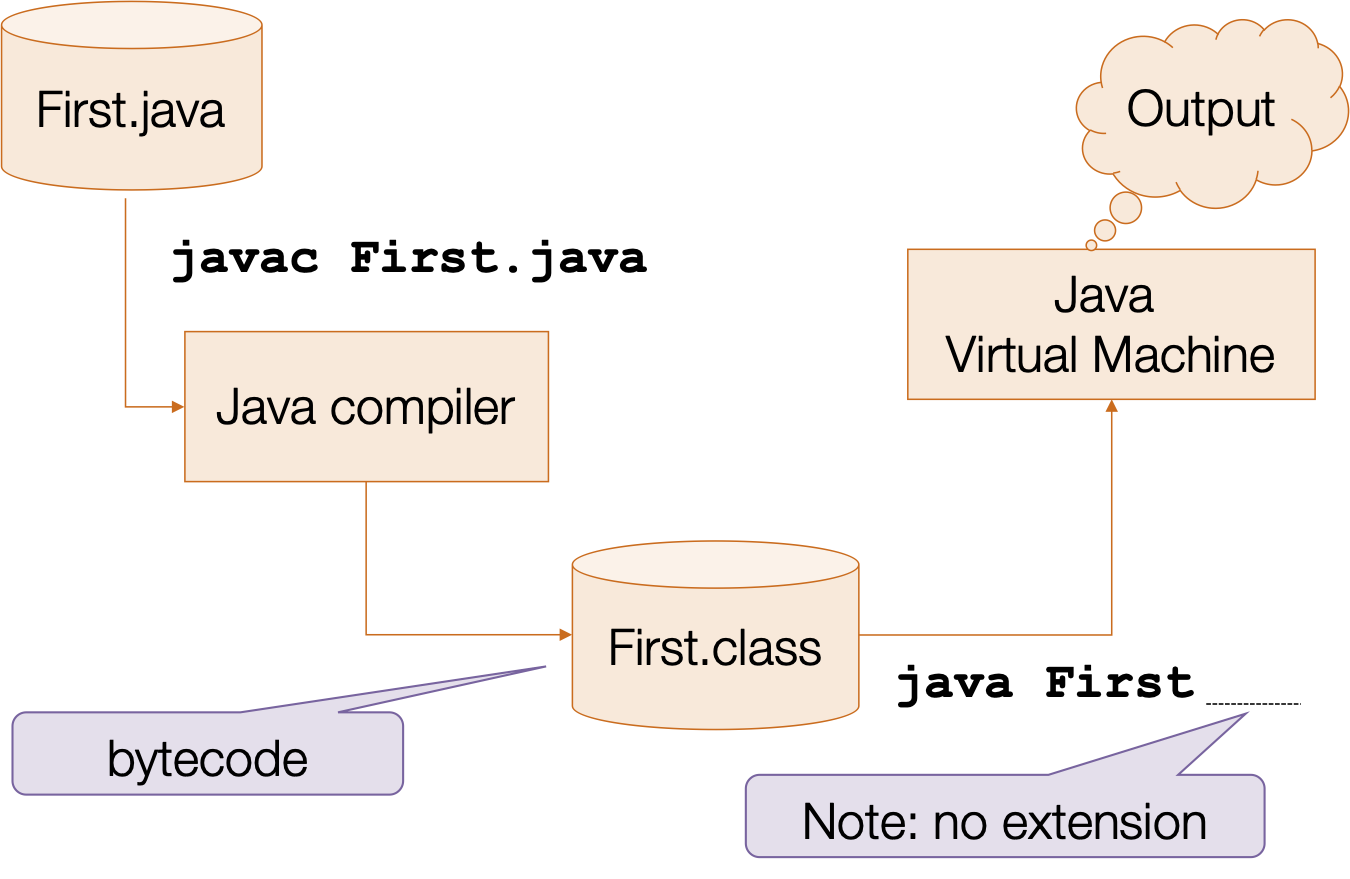
The compiler javac takes a list of source files to be compiled and generates the corresponding .class bytecode files.
If a java file refers to a class that is not included in the list, the compiler looks in the predefined libraries and if not found looks for the source code file and adds it to the compilation list.
After all files have been compiled, the compiler checks for cross-reference integrity.
The key of Java platform portability lies in the bytecode. It is an executable intermediate code that can be run by the JVM. The bytecode is independent from the processor architecture or the operating system. As long as you have a JVM for your platform you can execute the bytecode, which is always the same.
Java bytecode .class files start with the following 4 bytes: 0xCAFEBABE. This is called the file magic number; it is a specific initial sequence of a file that let the OS and other programs identify its content type, e.g. PDF files start with chars “%PDF”
JVM loading is based on the classpath that is the list of locations whence classes can be loaded.
When class Cls is required, the JVM, for each location in the classpath:
- Looks for file
Cls.class - If present, loads the class
- Otherwise moves to next location and repeats
Example file: First.java:
public class First {
  public static void main(String[] args){
    int a;
    a = 3;
      IO.println(a);
  }
}
The execution of the command: java First by the JVM entails the following steps:
- takes the name of the class (
First), which means that the corresponding bytecode will be in a file namedFist.class, - looks for the bytecode for that class in the classpath (and
.eventually), - loads the class’s bytecode,
- performs all due initializations,
- looks for a suitable
main()method in the class, - start the execution by calling the
main()method.
If the Java VM is not able to find a class it shows an errore exception of ClassNotFoundException. A typical reason for this error is that the name of the class on the command line must not include the extension .class; e.g.. java First not java First.class. Another possible cause is that the JVM looks for classes starting from the current working directory.
Since the JVM interprets the instructions that use the bytecode notation, it is slower that other languages that are compiled directly into the CPU native code.
The typicial questions: Which is more “powerful”: Java or C? Can be asnwered with it depends:
Performance-wise: C is better though non that much better. If an unexperience programmer starting from the official JVM specification execution times of equivalent programs can be expected to increased by 20X. The original JVM sported a time increase of around 5 to 10 times, this is not only due to the inherent overhead of the interpretation but also to the additional run-time checks performed by the JVM (e.g. array boundaries). Modern JVMs use a technique called Just-in-time compilation (JIT), using this approach the JVM takes the bytecode, translates it into the native code for the CPU, and calls the native code. Using this approach the resulting overhead can be aroung 10-15%.
In term of Ease of use: Java is extremely easier to use
As far as error containment is concerned, Java is far superior to what we can achieve in C thanks to more detailed checks at both compile time and run time (which are also a cause of the performance penalty).
4.3.2 Types of Java programs
Application
- It’s a common program, similarly to C executable programs
- Runs through the Java interpreter (java) of the installed JVM
public class HelloWorld {
    public static void main(String args[]){
        IO.println(“Hello world!”);
    }
}
Servlet (web server)
- In J2EE (Java 2 Enterprise Edition)
Midlet (mobile devices)
- In J2ME (Java 2 Micro Edition)
Android App (Android device)
Applet (client browser) now deprecated
- Java code dynamically downloaded
- Execution is limited by a browser “sandbox”
4.4 Deployment
In java there is no linking step that compines together several different object files into a single executable. All the bytecode .class files are independent dynamically loaded code fragments.
To simplify deployment, often Java programs are packaged and deployed in .jar files.
Jar files are compressed archives using the zip file format, that contain all the .class files required for an application. A .jar file contains additional meta-information that can be used for the deployment and execution.
The JVM is capable of accessing directly the .class files that are contained in a .jar, without the need to decompress it.
The SDK includes the jar program to perform all operation with .jar files. The main jar commands are:
A jar file can be created using, e.g.,
jar cvf my.jar *.classThe contents can be seen with:
jar tf my.jarTo define a main class, a manifest file must be added to the jar with:
jar cvfm my.jar manifest.txtSimplest manifest to define the main class:
Main-Class: First.java
Usage of jar files:
To run a class included in a jar:
java -cp my.jar FirstThe
-cp my.jaroption adds the jar to the JVM classpathWhen a main class for a jar is defined, it can be executed simply by:
java -jar my.jar
In Java there is not the equivalente of a single stand-alone executable file such as an “.exe”. Although using the GNU porting of the Java compiler (GCJ) is is possible to compile Java code into native code, combine it with the libraries and generate a standalone executable file.
4.5 Coding conventions
- Use
camelBackCapitalizationfor compound names, not underscore - Class name must be Capitalized
- Method names, object instance names, attributes, method variables must all start in lowercase
- Constants must be all uppercases (w/ underscore):
DEFAULT_VALUE - Indent properly
Example:
- 1
-
constants are capitalized, and possibly use
_to join words - 2
- attributes start with lower case and are camel cased
- 3
- method names start with lower case and are camel cased
- 4
- variables start with lower case and are possibly camel cased
4.6 FAQ
- I downloaded Java on my PC but I cannot compile Java programs:
- Check you downloaded Java SDK (including the compiler) not Java RTE or JRE (just the JVM)
- Check the OS path includes the
path/to/java/bin - Note: IDEs often use a different compiler than javac minor differences can be expected
4.7 Wrap-up
- Java is a quasi-pure OO language
- Java is interpreted
- Java is robust (no explicit pointers, static/dynamic checks, garbage collection)
- Java provides many utilities (data types, threads, networking, graphics)
- Java can used for different types of programs
- Coding conventions are not “just aesthetic”