11 Java Stream
Stream: a sequence of elements from a source that supports data processing operations. Operations are defined by means of behavioral parameterization
11.1 Basic features:
The key features of the Stream API in Java are:
- Pipelining
- Internal iteration: no explicit loops statements
- Lazy evaluation (pull-architecture): no work until a terminal operation is invoked
11.1.1 Pipelining
Often processing of large amounts of information consists in several steps applied one after another.
There are several different approaches to writing such chained procesessing:
- using intermediate step results,
- using function composition,
- using a pipeline.
Let us consider the simple case of a processing chain that prints the first four elements of sequence of words after converting them to lower case.
Using intermediate steps results it can be written as:
List<String> words =  Arrays.asList("There","must","be","some","way","out","of","here");
List<String> lowercase = map(words, String::toLowerCase);
List<String> four = lowercase.subList(0, 4);
four.forEach(IO::println);
An alternative approach is the composition of functions:
forEach(
    limit(
        map(Arrays.asList("There","must","be","some","way","out","of","here"),
            String::toLowerCase
        ),
        4
    ),
    IO::println
);
Finally with the use of the Stream API it can be written as a pipeline:
Stream.of("There","must","be","a","way","out","of","here")
      .map(String::toLowerCase)
      .limit(4)
      .forEach(System.out::println);
Each stage in the expression, written one per line, can be represented as a pipeline as represented in Figure 11.1.
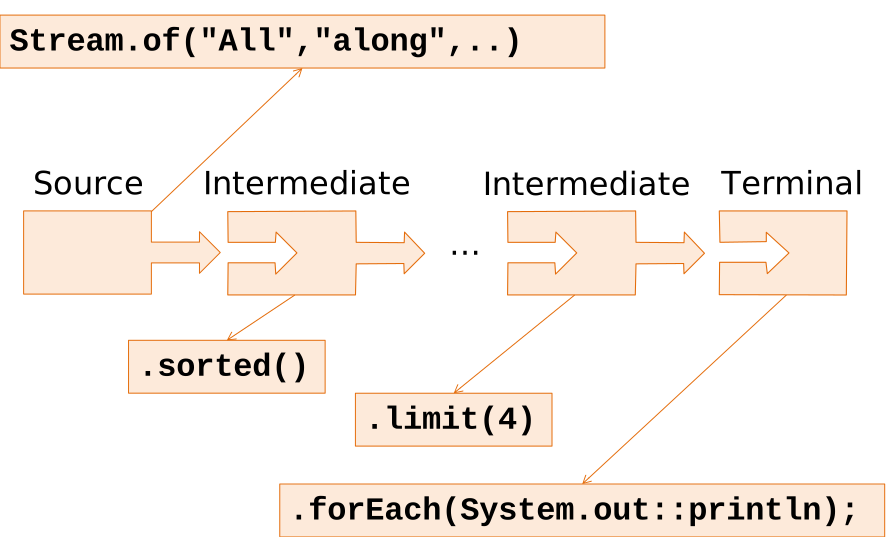
The elements flow from one stage to the next where they are processes independently.
11.1.2 External vs. Internal iteration
The operations that are parte of a Stream expression, in fact, iterate on the elements that flow throw the stream.
In general, any time an iteration is required, it can be expressed explicitly:
for(String word : lyrics){
    out.println(word);
}
or implicitly:
lyrics.forEach( out::println );The former version, using external (or explicit) iteration
- mixes how and what,
- allows fine grained control,
- it is more verbose,
- permits multiple (nested) iterations
The latter version, using internal (implicit) iteration:
- focuses on what,
- it is more concise,
- it is less error prone,
- avoids fine grained control.
Functionally equivalent code to the one printing the first for words can be re-written using usual – explicit – iteration:
int count=0;
for(String word : lyrics){
    String lc = word.toLowerCase();
    System.out.println(lc);
    if(++count>=4) break;
}
This version, when compared to the previous Listing 11.1 version is more vebose, haderd to understand, more error prone.
Moreover, implicit iteration has the advantage of allowing transparent optimization, e.g. enabling parallel processing without changing a single line of client code.
11.1.3 Lazy evaluation
Stream pipelines are built first, without performing any processing. Then they are executed, in response to the requests of a terminal operation. In general only the minimal amount of processing is performed in order to produce the final result.
Often instead of accepting a value – whose computation might be expensive –, a Supplier<T> can be used, to delay the creation of objects until when and if required, e.g.: the supplier argument in collect() is a factory object as opposed to passing an already created accumulating object.
Lazy evaluation is achieved using a pull architecture. In regular (explicit code) the iteration read the elements and pushes them through the sequence of operations. Differently, in Stream based code, the terminal operation pulls the elements from the previous stage, which pulls from the previous one and so on until the source is requested the next element.
11.1.4 Kinds of Operations
Operations of a stream can be classified based on their complexity:
- Stateless operations: No internal persistent storage is required E.g.
map(),filter() - Stateful operations: Require internal persistent storage, can be
- Bounded: require a fixed amount of memory, e.g.
reduce(),limit() - Unbounded: require unlimited memory, e.g.
sorted(),collect()
- Bounded: require a fixed amount of memory, e.g.
11.2 Source operations
The main Stream sources that takes the elements from an array or a list are:
| Operation | Args | Purpose |
|---|---|---|
static Arrays.stream() |
T[] |
Returns a stream from an array |
static Stream.of() |
T... |
Creates a stream from the list of arguments or array |
default Collection.stream() |
- | Returns a stream from a collection |
The static method static Stream<T> Arrays.stream() accepts an array and creates a stream whose elements are the elements of the array:
String[] s={"One", "Two", "Three"};
Arrays.stream(s).forEach(System.out::println);
A similar method is the static Stream<T> Stream.of(T... values), that accepts a variable numbers of arguments – which can be provided as a single array – and builds a stream:
Stream.of("One", "Two", "Three").forEach(System.out::println);A stream can be built out of any collection with the method Stream<T> Collection.stream().
Collection<String> coll = Arrays.asList("One", "Two", "Three");
coll.stream().forEach(System.out::println);
Another option is to generate the elements of a stream using code that generates the element of the stream:
| Operation | Args | Purpose |
|---|---|---|
generate() |
Supplier<T> s |
Elements are generated by calling get() method of the supplier |
iterate() |
T seed, UnaryOperator<T> f |
Starts with the seed and computes next element by applying operator to previous element |
empty() |
Returns an empty stream |
Generate elements using a Supplier
Stream.generate( () -> Math.random()*10 );Generate elements from a seed
Stream.iterate( 0, prev -> prev + 2 );Warning: the two above methods generate infinite streams. It is possible to use a variation of iterate() that has an addition argument (hasNext), a predicate that states if a next element is available:
Stream.iterate( 0, n -> n<1000, prev -> prev + 2 );11.3 Intermediate operations
| Operation | Args | Purpose |
|---|---|---|
limit() |
int |
Retains only first n elements |
skip() |
int |
Discards the first n elements |
filter() |
Predicate<T> |
Accepts element based on predicate |
sorted() |
none or Comparator<T> |
Sorts the elements of the stream |
distinct() |
none | Discards duplicates |
map() |
Function<T, R> |
transforms each element of the stream using the mapper function |
11.3.1 Skip and Limit
It is possible to retain only the first n elements of to discard the first n elements with the methods limit() and skip().
To use only the elements from second to fourth:
Stream.of(lyrics)
.limit(4)
.skip(1)
.forEach(System.out::println);
11.3.2 Filtering
Filtering is perfomed with method default Stream<T> filter(Predicate<T>) that accepts a predicate. The predicate can be a method reference returning a boolean, possibly modified with Predicate methods:
Stream.of(lyrics)
.filter(Predicate.not(String::isBlank))
.forEach(System.out::println);
Alternatively the predicate can be a lambda expression:
Stream.of(lyrics)
.filter(w -> Character.isUpperCase(w.charAt(0)))
.forEach(System.out::println);
Filtering is a stateless operation, each execution is independent from previous ones and requires no storage.
11.3.3 Distinct
It is possible to discard the duplicate elements in the stream with the method default Stream<T> distinct().
Stream.of(lyrics)
.distinct()
.forEach(System.out::println);
The distinct() operation is stateless and unbounded. It has to keep track of all the elements that were already encountered to discard all the duplicates.
11.3.4 Sorted
Sorting is performed default Stream<T> sorted() that release the elements in ordered.
The order can be either the natural order, when providing no argument:
Stream.of(lyrics)
.sorted()
.forEach(System.out::println);
Or with specific ordering when a comparator is passed:
Stream.of(lyrics)
.sorted(Comparator.comparing(String::length))
.forEach(System.out::println);
The sorted() operation is stateless and unbounded. It has to buffer all the elements of the stream before being able to release the first one.
11.3.5 Mapping
The mapping operation transforms the element, the tranformation is applied with the method default Stream<R> map(Function<T,R> mapper).
Stream.of(lyrics)
.map(String::toLowerCase)
.forEach(System.out::println);
11.3.6 Flat mapping
The method <R> Stream<R> flatMap(Function<T, Stream<R>> mapper) extracts a stream from each incoming stream element and concatenates together the resulting streams.
The context where this kind of operation might be usefule is when the stream elements are containers (e.g., List or array). Typically this occurs when elements are mapped to containers or arrays.
Often the next operations should be applied to all elements inside those containers, not to the containers themselves.
Typically:
Tis aCollection<R>(or a derived type) or[]- mapper can be
Collection::streamorStream.of()
To print out all the distinct characters used in the text:
Stream.of(lyrics)
  .map(String::toCharArray)
  .flatMap(Stream::of)
  .forEach(System.out::println);
11.4 Terminal Operations
| Operation | Return | Purpose |
|---|---|---|
findAny() |
Optional<T> |
Returns the first element(order does not count) |
findFirst() |
Optional<T> |
Returns the first element(order counts) |
min()/ max() |
Optional<T> |
Finds the min/max element based on the comparator argument |
count() |
long |
Returns the number of elements in the stream |
forEach() |
void |
Applies the Consumer function to all elements in the stream |
toList() |
List<T> |
Retuns a list containing all the elements |
toArray() |
T[] |
Returns an array containing all the elements |
anyMatch() |
boolean |
Checks if any element in the stream matches the predicate |
allMatch() |
boolean |
Checks if all the elements in the stream match the predicate |
noneMatch() |
boolean |
Checks if none element in the stream match the predicate |
11.4.1 For each
All the examples above used this terminal operation that performs the given action on all elements.
A typical usage is to print all the elements:
Stream.of(lyrics)
.forEach(System.out::println);
Another option is to perform an operation on an external object:
StringBuffer res=new StringBuffer();
Stream.of(lyrics)
.forEach(res::append);
It is important to use a clase whose methods are reentrant (synchronized) so that a parallel execution of the stream does not creates race conditions leading to inconsistent results.
11.4.2 To container
The methods toList() and toArray() can be used to collect all the elements into a container or array.
11.4.3 Find
The two methods findAny() and findFirst() return the first element in the stream.
The difference is that the former allows optimization for parallel streams and therfore is not deterministic. While the latter is deterministic and returns alwasy the first element of the stream.
Both methods return an Optional<T> to cope with the possibility of an empty stream.
11.4.4 Min and Max
The two methods min(Comparator<? super T> cmp) and max(Comparator<? super T> cmp) return the first and last elements according to the order determined by the comparators.
String first =
Stream.of(lyrics)
.min(Comparator.naturalOrder())
.getOrElse("<none>");
Both methods return an Optional<T> to cope with the possibility of an empty stream.
11.4.5 Count
The method count() returns the number of elements present in the stream.
The return type is a long to minimize the risk of overflow when processing long streams.
11.4.6 Matching
The methods boolean anyMatch(Predicate<T> predicate), boolean allMatch(Predicate<T> predicate), boolean noneMatch(Predicate<T> predicate) check respectively:
anyif at least an element matches the predicate,allif all elements match the predicate,noneif no element matches the predicate.
11.5 Numeric streams
To optimize performance when treating numeric values, and avoid the overhead induced by the wrapper classes, the library provides specialized streams for the three main numeric primitive types:
DoubleStreamIntStreamLongStream
11.5.1 Conversion
It is possible to map to primitive streams using the conversion methods from Stream<T>: mapToX() that are defined for the main primitive types:
IntStream mapToInt(ToIntFunction<T> mapper)LongStream mapToLong(ToLongFunction<T> mapper)DoubleStream mapToDouble(ToDoubleFunction<T> mapper)
The inverse conversion can be performed using:
mapToObj(XFunction<U> mapper): applies a function that converts theintelement into any objectboxed(): performs a simle boxing
11.5.2 Generators
The primitive streams provide additional generator methods, in particular both IntStream and LongStream provide a range(start,end) method that can be used to generate a sequence of numbers.
The class Random offers a few method to generate a primitive stream of random numbers:
DoubleStream doubles()IntStream ints()LongStream longs()
The three methods offer four variations:
- no arguments: generates an infinite stream of random numbers
- two arguments: generates an infinite stream of random numbers in the given range
- one long argument: generates a stream of random numbers of the given length
- three argument: generates a stream of random numbers of the given length in the given range
11.5.3 Terminal operations
The numeric streams provide a set of additional terminal operations.
| Operation | Return | Purpose |
|---|---|---|
sum() |
OptionalX |
Returns the sum of all elements |
average() |
OptionalDouble |
Returns the average of all elements |
min()/ max() |
OptionalX |
Finds the min/max |
summaryStatistics() |
XSummaryStatistics |
Returns the summary statistics of the stream elemens |
11.5.4 Performance
Primitive numeric streams are more efficient since no boxing and unboxing operations are required.
For instance to find the maximum value of a stra Numeric streams
Random rnd = new Random(1971);
int[] ints = rnd.ints(N, 0, 10000).toArray();
int max = IntStream.of(ints).max().getAsInt();List<Integer> lints = IntStream.of(ints).mapToObj(Integer::valueOf).toList();
int max = lints.stream().max(Comparator.<Integer>naturalOrder()).get();| Stream type | Performance |
|---|---|
IntStream |
0.6ns per element |
Stream<Integer> |
2.6ns per element |
The direct comparison of int values is approximatively four times more efficient that the usage of the naturalOrder() comparator.
11.6 Reducing
The reduce operation combines the elements of the stream together to produce a final result. It can be performed through:
reduce(BinaryOperator<T> reducer): produces the temporary result by combining the previous result with the next element with thereducer;reduce(T identity, BinaryOperator<T> reducer): starts with a result that is theidentitythen computes the next result by combining the previous result with the next element;reduce(U identity, BiFunction<U,T,U> reducer, BinaryOperator<U> combiner): same as above but the result is not the same type as the elements, acombineris used to combine results from parallel streams.
Reduces the elements of this stream, using the provided identity value and an associative merge function
int maxLen =
Stream.of(lyrics)
.distinct()
.map(String::length)
.reduce(0, Math::max);
The above reduce computes the max as described in Figure 11.2.
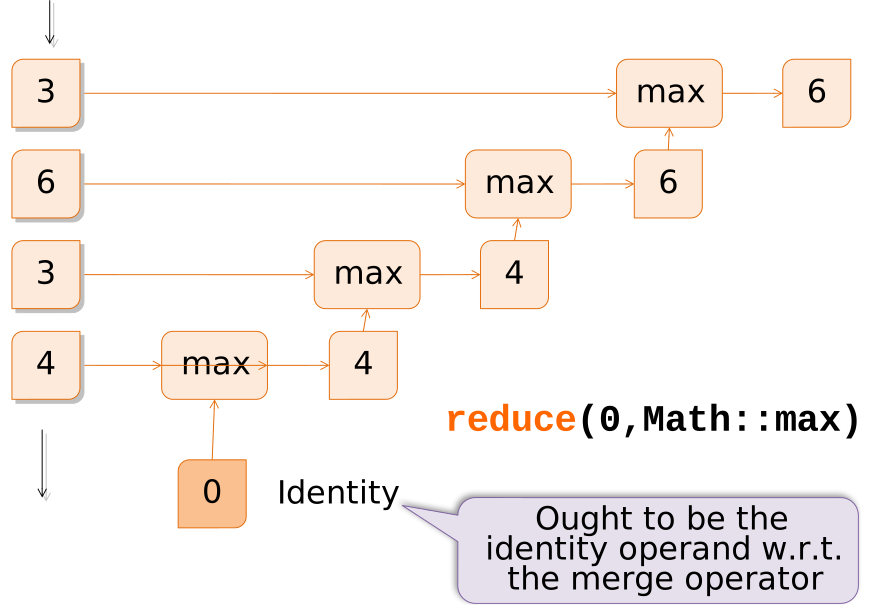
Reduce operation can be easily parallelized since the operation is the same for any pair of elements.
- 1
- serial reduce
- 2
- parallel reduce
The resulting performance of the two alternatives is:
| Stream kind | Performance |
|---|---|
| Serial | 0.6ns per item |
| Parallel | 0.1ns per item |
Potentially up to n times faster, where n is the number of CPU cores available. In practice synchronization issues can introduce a significant overhead.
11.7 Collecting
The methdo Stream.collect() takes as argument a recipe for accumulating the elements of a stream into a result container.
The recipe defined by the collector includes three elements:
- a supplier providing a result container object
- an accumulator that accumulates a new element into the result
- a combiner that merge two intermediate results (typically used in case of parallel streams)
To accumulate the elements into a list:
- 1
- supplier of the container result
- 2
- accumulator
- 3
- combiner
The operations performed by the collecter defined as above is described in Figure 11.3.
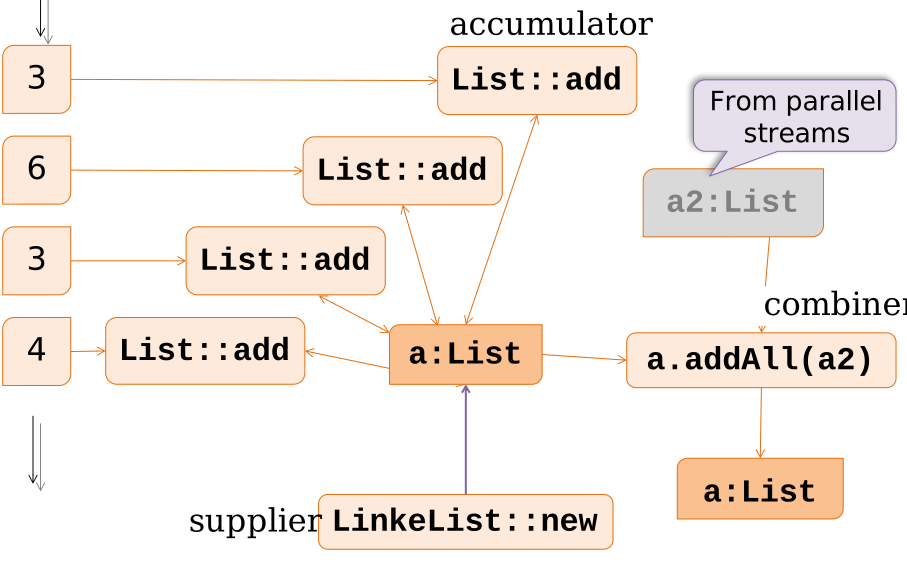
Note that the above operation should be avoided, the method toList() of Stream is a much more compact and efficient alternative.
Collection is a stateful operation and unbounded operation. The memory occupation depends on the number of elements processed.
11.7.1 Collect vs. Reduce
The main difference between the collect and reduce operations are:
- Reduce is bounded, the merge operation can be used to combine results from parallel computation threads
- Collect is unbounded, combining results form parallel computation threads can be performed with the combiner
11.7.2 Predefined Collectors
Java Stream API provides a number of predefined collectors. Predefined recipes are returned by static methods in Collectors class
The methods are easier to access through:
import static java.util.stream.Collectors.*;
For insatance to compute the average of a sequence of numbers
double averageWord = Stream.of(txta)
    .collect(averagingInt(String::length));
A few collectors summarize the sequence of elements in the stream. Such elements.
| Collector | Return | Purpose |
|---|---|---|
counting() |
long |
Count number of elements in stream |
maxBy() / minBy() |
T (elements type) | Find the min/max according to given Comparator |
summingType() |
Type | Sum the elements |
averagingType() |
Type | Compute arithmetic mean |
summarizingType() |
TypeSummary Statistics |
Compute several summary statistics from elements |
Accumulating collectors accumulate the elements into group containers.
| Collector | Return | Purpose |
|---|---|---|
toList() |
List<T> |
Accumulates into a new List |
toSet() |
Set<T> |
Accumulates into a new Set (i.e. discarding duplicates) |
toCollection(Supplier<> cs) |
Collection<T> |
Accumulate into the collection provided by given Supplier |
joining() |
String |
Concatenates into a String Optional arguments: separator, prefix, and postfix |
To find out the three longest words in text:
List<String> longestWords = Stream.of(txta)
.filter( w -> w.length()>10)
.distinct()
.sorted(comparing(String::length).reversed())
.limit(3)
.collect(toList());
What if two words share the 3rd position?
Grouping collectors divide the elements into separate streams, by means of a classifier function (or predicate). Each separate stream is then further collected – by default into a list – and placed into a map with the corresponding classification label as the key.
| Collector | Return | Purpose |
|---|---|---|
groupingBy(Function<T,K> classifier) |
Map<K, List<T>> |
Maps according to the key extracted (by classifier) and adds to list. |
partitioningBy(Predicate<T> p) |
Map<Boolean, List<T>> |
Split according to partition function (p) and add to list. |
The method groupingBy() uses the classifier argument to define the keys of the resulting map and to separate the elements into separate streams that are then collected into lists.
For instance to group the words into group according to their length:
Map<Integer,List<String>> byLength =
    Stream.of(lyrics)
    .distinct()
    .collect(groupingBy(String::length));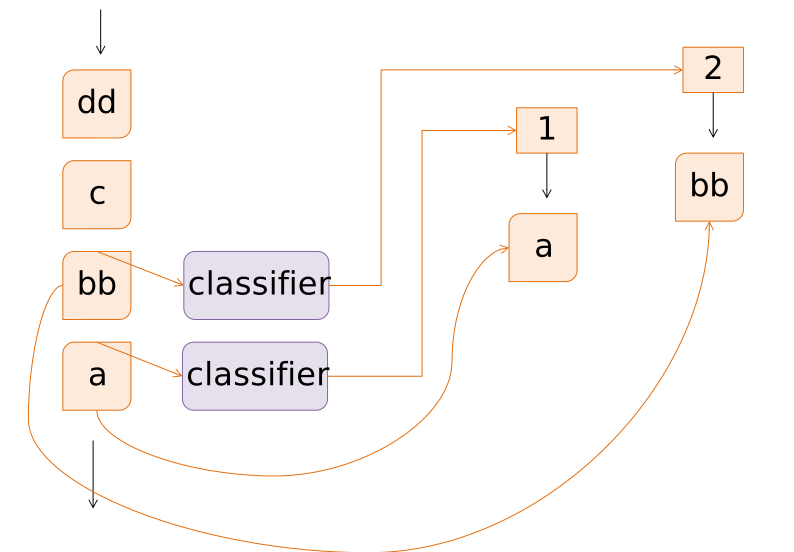
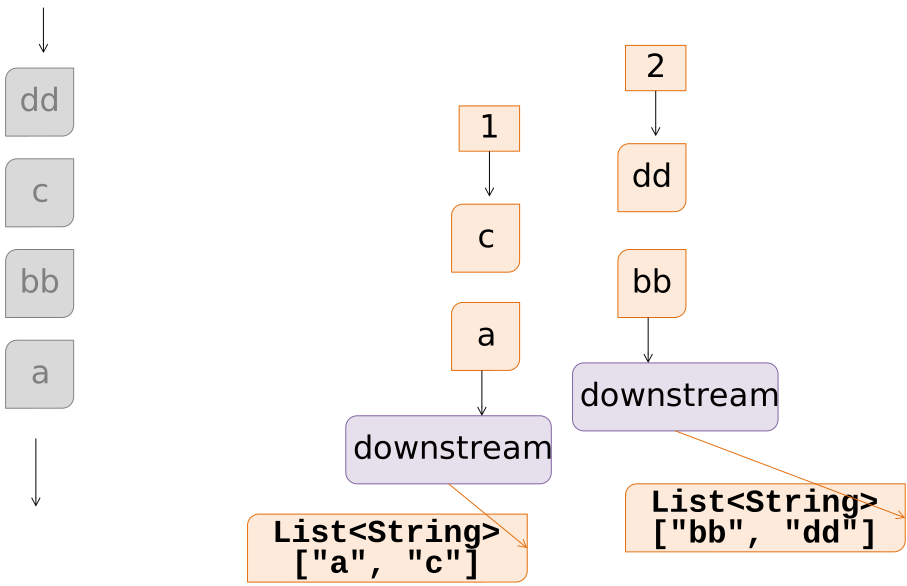
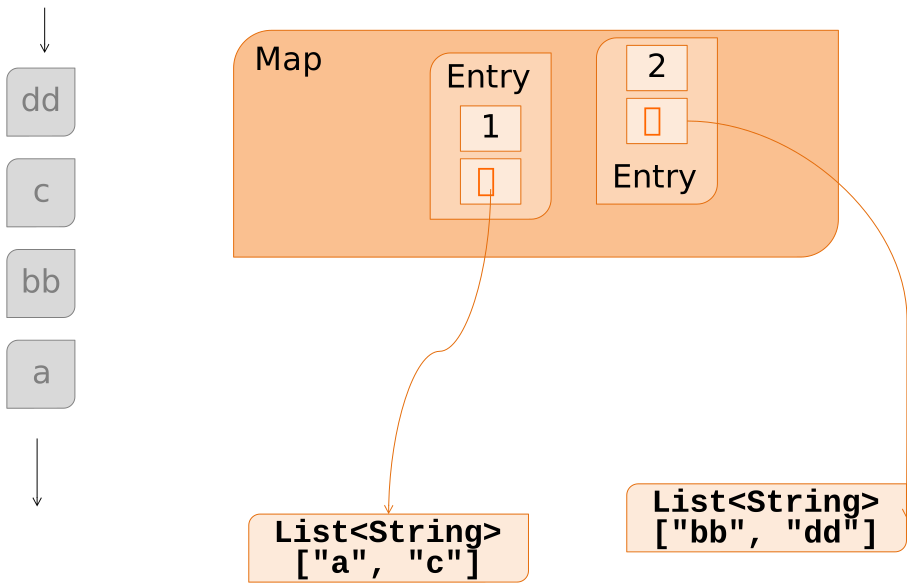
The method accepts two additional optional arguments, a map factory supplier and the downstream collector. The above code, using the default behavior, can be rewritten as:
- 1
- classifier, determines the key and the stream split criterion
- 2
- map factory, build the result container
- 3
- downstream collector, collects the spearate stream
The map factory can be leveraged to create, e.a. a sorted map
Map<Integer,List<String>> byLength =
    Stream.of(lyrics).distinct()
    .collect(groupingBy(String::length,
1                ()-> new TreeMap<>(reverseOrder()),
toList()))- 1
- Map sorted by descending length
The downstream collector can be used to collect into a something different than a List.
- 1
- Grouped by word, i.e. the very same element
- 2
-
Downstream is
counting
To create the ranking of words by frequency we can take the result of the frequency – as computed above –, sort the entry set by the key – the value – and map the sorted entries to strings:
List<String> freqSorted =
Stream.of(lyrics)
.collect(groupingBy(Function.identity(), counting()))
.entrySet().stream()
.sorted(
  comparing(Map.Entry<String,Long>::getValue)
  .reversed())
.map( e -> e.getValue() + ":" + e.getKey())
.collect(toList());
11.7.3 Collector Composition
| Collector | Purpose |
|---|---|
collectingAndThen(Collector<T,?,R> cltr, Function<R,RR> mapper) |
Apply a transformation (mapper) after performing collection (cltr) |
mapping(Function<T,U> mapper, Collector<U,?,R> cltr) |
Performs a transformation (mapper) before applying the collector (cltr) |
The ranking computed above could be also expressed using the collectingAndThen() composition method:
- 1
- collecting
- 2
- and then
Note the type parameter specification <String,Long> that is required to let the compiler correctly infer the type of the comparator.
An alternative way of computing the ranking and storing it into a sorted map is:
- 1
- collecting
- 2
- and then
11.7.4 Custom collectors
The interface Collector is defined as follows:
- 1
- Creates the accumulator container
- 2
- Adds a new element into the container
- 3
- Combines two containers (used for parallelizing)
- 4
- Performs a final transformation step
- 5
- Capabilities of this collector
In addition to implementing the interface, it is possible to build a collector using the builder function Collector.of():
static Collector<T,A,R> of(
    Supplier<A> supplier,
    BiConsumer<A,T> accumulator,
    BinaryOperator<A> combiner,
    Function<A,R> finisher,
    Characteristic... characteristics)
Using this function, possibly with method references and/or lambda functions is more compact than extending the interface Collector
- 1
- supplier
- 2
- accumulator
- 3
- combiner
- 4
- finisher
The Characteristics class defines a set of constants that specify the features of the collector:
IDENTITY_FINISHFinisher function is the identity function therefore it can be elidedCONCURRENTAccumulator function can be called concurrently on the same containerUNORDEREDThe operation does require stream elements order to be preserved
Such Characteristics can be used to optimize execution. If both CONCURRENT and UNORDERED, then, when operating in parallel, the accumulator method is invoked concurrently by several threads and the combiner is not used.
An example of a collector used to compute the average length of a stream of String, eses the AverageAcc accumulator object:
Collector<Integer,AverageAcc,Double>
avgCollector =  Collector.of(
            AverageAcc::new,    // supplier
            AverageAcc::addWord,// accumulator
            AverageAcc::merge , // combiner
            AverageAcc::average // finisher
);
The class AverageAcc can be defined ase:
class AverageAcc {
    private long length;
    private long count;
    public void addWord(String w){
     this.length+=w.length();// accumulator
        count++;    }
    public double average(){   // finisher
        return length*1.0/count;    }
    public AverageAcc merge(AverageAcc o){
        this.length+=other.length;
        this.count+=other.count;  // combiner
        return this;}
}
11.8 Exceptions and Functional Interfaces
Functional interfaces largely used in Stream API do not include exceptions. Lambdas and method reference are not allowed to throw (checked) exceptions This is mainly due to the intermediate code that does not handle exceptions. One motivation for such a choice is the additional complexity that would arise when type parameters also include exceptions.
Unchecked exceptions works as usual and interrupt the stream processing
Stream.of("1","2","B","6","30")
1.mapToInt( s -> Integer.parseInt(s) )
.sum();- 1
-
a
NumberFormatExceptioninterrupts all the processing.
In case code throwing unchecked exception needs to be used within stream operations, a few possible strategies can be applied:
- Bury the exception: catch the exception and ignore it
- Wrap the exception: use
RuntimeExceptionpointing to the original one - Sneaky exceptions: throw as unchecked (using a trick)
- Annotate the results: insert additional information in the result
11.8.1 Bury the exception
Stream.of("1","2","B","6","30")
.mapToInt( s -> {
    try{ return convert(s); }
    catch(NotANumber e)
    { return 0; }
})
.sum();
11.8.2 Wrap the exception
Stream.of("1","2","B","6","30")
.mapToInt( s -> {
    try{ return convert(s); }
    catch(NotANumber e)
    {throw new RuntimeException(e);     }})
.sum();
11.8.3 Sneakily throw the exception
Stream.of("1","2","B","6","30")
.mapToInt( s -> {
    try{ return convert(s); }
    catch(NotANumber e)
    {sneakyThrow(e);
     return -1; }})
.sum();
```java

Sneaky throw method: using generics type erasure it is possible to “uncheck” an exception

```java
static <E extends Throwable>
void sneakyThrow(
    Exception exception) throws E {     throw (E)exception;
}
11.8.4 Annotate the results:
A suitable class must be defined that hosts:
- the result of the computation
- an “annotation” about anomalies, typically an exception
The operations are perfomed on the results and the possible exception annotation is carried on.
try{
    Annotated<Integer,ConversionException> result =
    Stream.of("1","2","B","6","30")
        .map( Annotated.applyWithAnnotation(StreamExceptions::convert) )
        .reduce( Annotated.identity(), Annotated.reduceWith(Integer::sum) );

    IO.println("Result: " + result.get());
}catch(ConversionException ce){
    IO.println("Trouble in computing: " + ce.getMessage());
}
An example of annotated result class is the following one:
public class Annotated<T,E extends Exception>{
    final T item;
    final E note;
    private Annotated(T i, E e){
        this.item=i; this.note=e;
    }
    public T getOrElse(Function<E,T> f){
        if(note==null) return item;
        return f.apply(note);
    }
    public T get() throws E {
        if( note!=null ) throw note;
        return item;
    }
    public boolean isClean() {
        return note==null;
    }
    public E annotation(){
        return note;
    }
    static <T, E extends Exception>
    BinaryOperator<Annotated<T,E>> reduceWith(BinaryOperator<T> op){
        return (a,b) -> {
            if(a.item==null) return b;
            return
            new Annotated<>(b.item==null?a.item:op.apply(a.item,b.item),
                            a.annotation==null?b.annotation:a.annotation);
        };
    }
    public static <T,E extends Exception>
    Annotated<T,E> identity(){
            return new Annotated<>(null,null);
    }

    public static <T,U,E extends Exception>
    Function<T,Annotated<U,E>> annotate(ThrowingFunction<T,U,E> f){
        return x -> {
            try {
                return new Annotated<>(f.apply(x),null);
            } catch (Exception e) {
                return new Annotated<>(null, (E)e);
            }
        };
    }

    interface ThrowingFunction<T,U,E extends Exception> {
        U apply(T x) throws E;
    }
}
11.9 Summary
- Streams provide a powerful mechanism to express computations of sequences of elements
- The operations are optimized and can be parallelized
- Operations are expressed using a functional notation
- More compact and readable w.r.t. imperative notation