14 Input-Output (Draft)
All I/O operations rely on the abstraction of stream (flow of elements). While the term stream is in commont the I-O steram just the abstract idea is shared with Stream API.
14.1 I/O Stream
An I/O stream can be linked to:
- A file on the disk
- Standard input, output, error
- A network connection
- A data-flow from/to different hardware devices
I/O operations work in the same way with all stream from any source
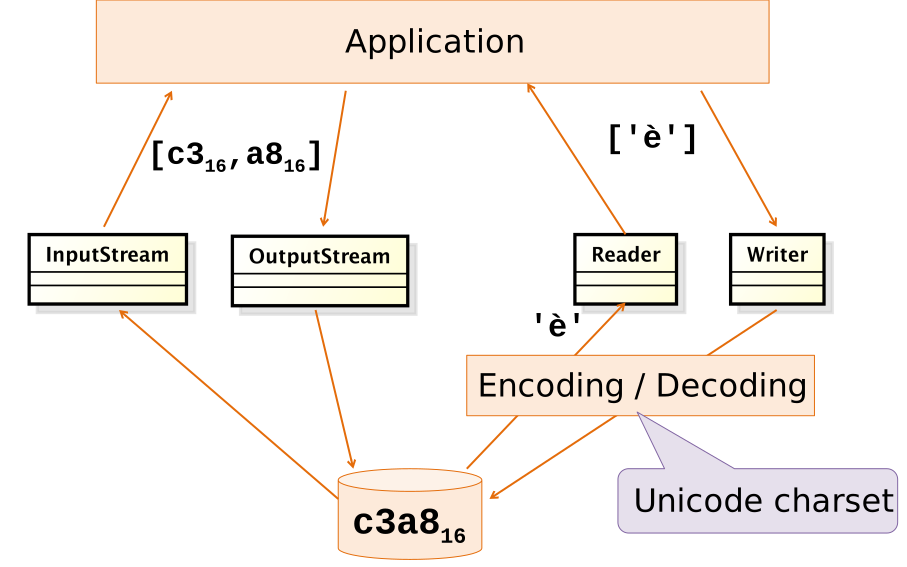
All I/O stream classes and interfaces are defined in package: java.io. There are two main families of streams:
- Streams of chars with main classes
ReaderandWriterused to handle all text contents - Streams of bytes with the main classes
InputStreamandOutputStream, used to handle binary data, e.g., sounds, images, videos.
All related exceptions are subclasses of IOException
14.1.1 Stream specializations
- Memory: R/W chars from/to array or String
- CharArrayReader
- CharArrayWriter
- StringReader
- StringWriter
- ByteArrayInputStream
- ByteArrayOutputStream
- Pipe Pipes are used for inter-thread communication they must be used in connected pairs
- PipedReader
- PipedWriter
- PipedInputStream
- PipedOutputStream
- File Used for reading/writing files
- FileReader
- FileWriter
- Buffered
- Printed
- Interpreted
14.2 Character Oriented Streams
14.2.1 Readers
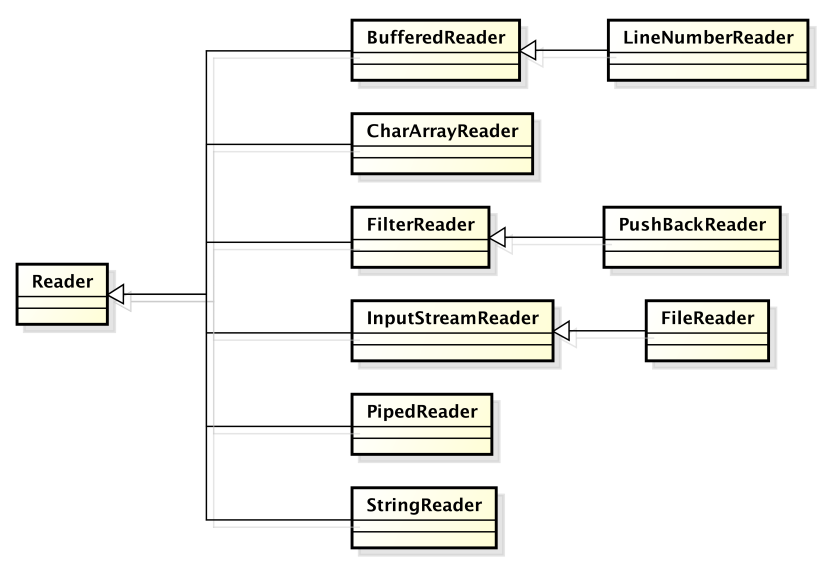
Reader (abstract)
- void close() Close the stream.
- int read() Read a single character: returns -1 when end of stream
- int read(char[] cbuf) Read characters into an array.
- int read(char[] cbuf, int off, int len) Read characters into a portion of an array.
- boolean ready() Tell whether the stream is ready to be read.
- void reset() Reset the stream, restart from beginning
- long skip(long n) Skip n characters
Read a subgkle character
int ch = r.read();
char unicode = (char) ch;
System.out.print(unicode);
r.close();| Character | ch |
unicode |
|---|---|---|
A |
\(0\ldots00000000 01000001_{bin} = 65_{dec}\) | 65 |
\n |
\(0\ldots00000000 00001101_{bin} = 13_{dec}\) | 13 |
| End of file | \(1\ldots11111111 11111111_{bin} = -1_{dec}\) | - |
Read a line
public static String readLine(Reader r) throws IOException{
  StringBuffer res= new StringBuffer();
  int ch = r.read();
  if(ch == -1) return null; // END OF FILE!
  while( ch != -1 ){
    char unicode = (char) ch;
    if(unicode == '\n') break;
    if(unicode != '\r’) res.append(unicode);
    ch = r.read();
  }
  return res.toString();
}
14.2.2 Writers
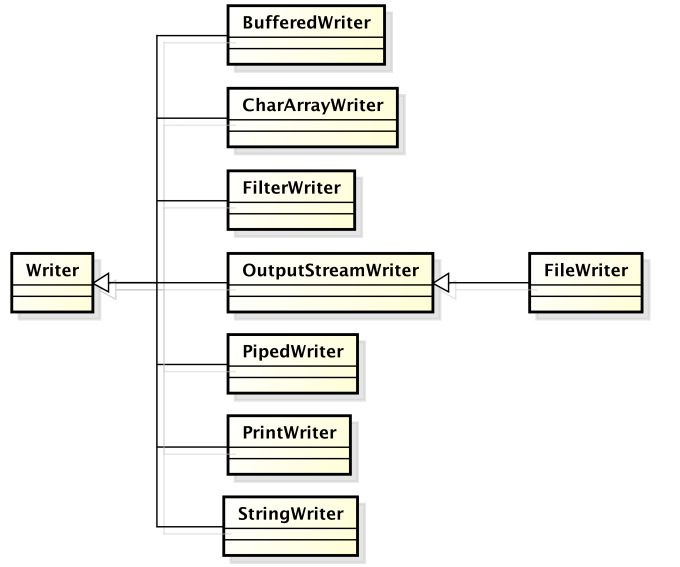
Writer (abstract)
- void write(int c) Write a single character.
- void write(char[] cbuf) Write an array of characters.
- void write(char[] cbuf, int off, int len) Write a portion of an array of characters.
- void write(String str) Write a string.
- close() Close the stream, flushing it first.
- abstract void flush() Flush the stream.
Output streams typically write to a memory buffer Much faster than writing e.g. to file (leverage memory hierarchy) When buffer is full a large chunk is written, as a whole, to the destination Program termination wipes buffers Programmer must explicitly ensure buffers are flushed using method close() or flush()
14.3 Byte Oriented Streams
14.3.1 Input streams
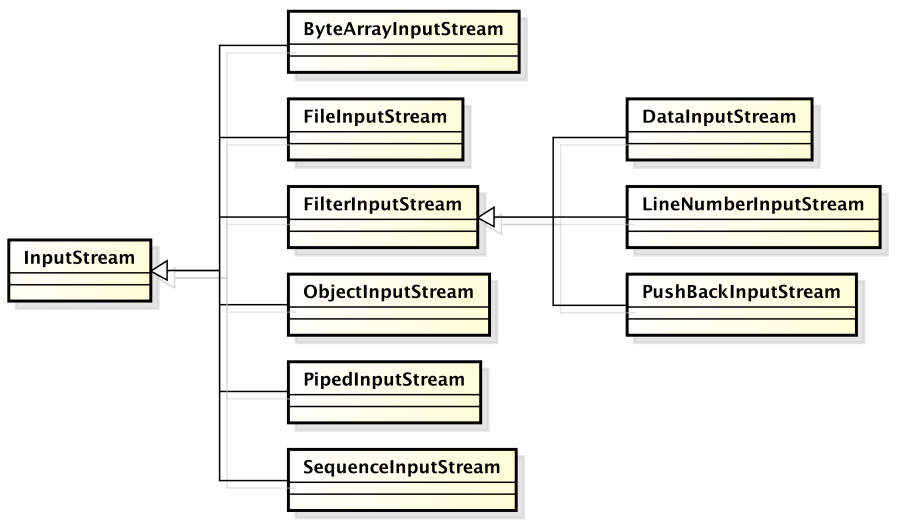
Class InputStream
- void close() Closes this input stream and releases any system resources associated with the stream.
- int read() Reads the next byte of data from the input stream.
- int read(byte[] b) Reads some bytes from the input stream and stores them into the buffer array b.
- int read(byte[] b, int off, int len) Reads up to len bytes of data from the input stream into an array of bytes.
- int available() Number of bytes that can be read (or skipped over) from this input stream without blocking.
- void reset() Repositions this stream to the position at the time the mark method was last called.
- long skip(long n) Skips over and discards n bytes of data from this input stream.
14.3.2 Output streams
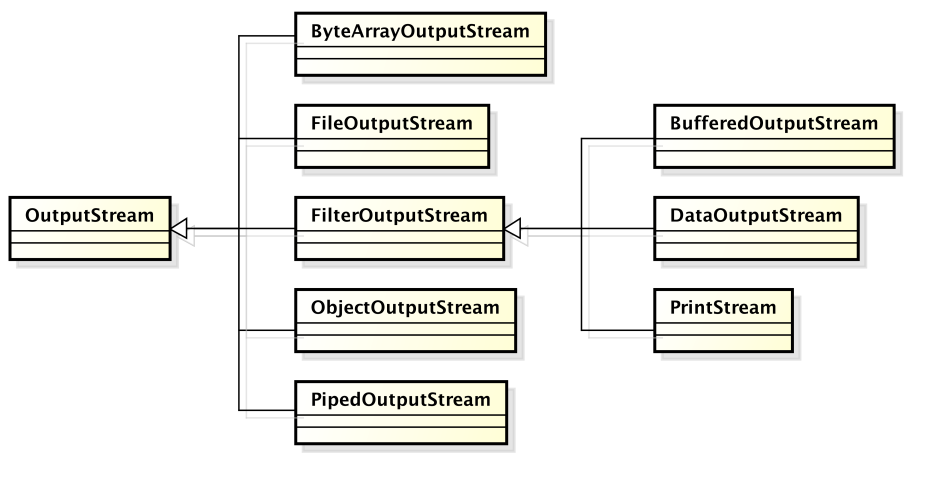
Class OutputStream
- void write(byte[] b) Writes b.length bytes from the specified byte array to this output stream.
- void write(byte[] b, int off, int len) Writes len bytes from the specified byte array starting at offset off to this output stream.
- void write(int b) Writes the specified byte to this output stream.
- void close() Closes this output stream and releases any system resources associated with this stream.
- void flush() Flushes this output stream and forces any buffered output bytes to be written out.
14.3.3 File streams
Copy text file
Reader src = new FileReader(args[0]);
Writer dest = new FileWriter(args[1]);
int in;
while( (in=src.read()) != -1){
    dest.write(in);
}
src.close();
dest.close();
Copy text file with buffer
Reader src = new FileReader(args[0]);
Writer dest = new FileWriter(args[1]);
char[] buffer = new char[4096];
int n;
while((n = src.read(buffer))!=-1){
  dest.write(buffer,0,n);
}
src.close();
dest.close();
14.3.4 Text file with encoding
InputStreamReaderbyte to charOutputStreamWriterchar to byte
The constructors allow specifying a charset to decode/encode the byte to/from characters
The text encoding of a stream can be defined using InputStreamReader for input
Reader r = new InputStreamReader(new FileInputStream("file.txt"), "ISO-8859-1");Since Java 11 a new constructur for class FileReader
Reader r = new FileReader("file.txt", Charset.forName("ISO-8859-1")) OutputStreamWriter for output
Writer w = new OutputStreamWriter(new FileOutputStream("out.txt", "ISO-8859-1"));Since Java 11 a new constructur for class FileWriter
Writer w = new FileWriter("file.txt", Charset.forName("ISO-8859-1")) 14.3.5 Buffered
BufferedInputStream BufferedInputStream(InputStream i) BufferedInputStream(InputStream i, int s)
BufferedOutputStream
BufferedReader readLine()
BufferedWriter
14.3.6 Printed streams
Class PrintStream
PrintStream(OutputStream o)Provides general printing methods for all primitive types, String, and Object- print() and println()
Designed to work with basic byte-oriented console
Does not throw IOException, but it sets a bit, to be checked with method checkError()
Default input and output streams are defined in class System using printed streams
class System {
  //…
  static InputStream in;
  static PrintStream out;
  static PrintStream err;
}
Default streams can be replaced setIn(), setOut(), setErr()
Example:
String input = "This is\nthe input\n";
InputStream altInput = new ByteArrayInputStream(input.getBytes());
InputStream oldIn = System.in;
System.setIn(altInput);
readLines();
System.setIn(oldIn);
14.3.7 Interpreted streams
Translate primitive types into / from standard format Typically on a file
DataInputStream(InputStream i)- readByte(), readChar(), readDouble(), readFloat(), readInt(), readLong(), readShort(), ..
DataOutputStream(OutputStream o)like write()
14.3.8 Streams and URLs
Streams can be linked to URL
URL page = new URL(url);
InputStream in = page.openStream();
Be careful about the type of file you are downloading.
Class URL Represents a URL Constructor may throw a MalformedURLException
Provide getters for URL portions: Protocol, Host, Port Path, Query, Anchor (Ref)
Method openStream() opens a connection and returns the relative InputStream
Download a file
URL home = new URL("http://…");
URLConnection con = home.openConnection();
String ctype = con.getContentType();
if(ctype.equals("text/html")){
  Reader r = new InputStreamReader(
                                        con.getInputStream());
  Writer w = new OutputStreamWriter(System.out);
  char[] buffer = new char[4096];
  while(true){
    int n = r.read(buffer);
    if(n==-1) break;
    w.write(buffer,0,n);
  }
  r.close(); w.close();
}
14.3.9 Stream as Resources
Streams consume OS resources and and such resources are limited. In general a process can open only a limited number of files at once. For this reason, IO streams should be closed as soon as possible to release resources.
This is the reason why all classes implement the AutoCloaseable interfaces so that they can be used with the try-with-resorce construct.
14.4 Serialization
Serialization is the procedure through which an object in memory can be transformed into a sequence of bytes that store its current state. Such a sequence of bytes can be written to any storage and retrieved later. The inverse process of Deserialisation is able to convert the sequence of bytes into an object in memory that has the same state as the original one.
Read / write of an object implies to read/write all the attributes of the object, and with their types. In particular a proper structure should be used to correctly separating different elements. When reading, a new object must be created and all its attributes values restored.
These operations (serialization) are automated by - ObjectOutputStream serialization - though method void writeObject(Object) - ObjectInputStream deserialization - through methdo Object readObject()
It is possible to serialize only objects implementing the interface Serializable. This interface is empty and works as a and flagging interface. This constraint avoid serialization of objects, without permission of the class developer. The implementation of the interfaces flags the classes that can meaningfully serialized.
A critical problem in deserialization is type recovery: when reading, an object is created, but which is its type? In practice, not always a precise downcast is required: only if specific methods need to be invoked. A downcast to a common ancestor can be used to avoid identifying the exact class.
Serialization is applied recursively to object pointed to by reference attributes. Of course the referenced objects must implement the Serializable interface. Specific fields can be excluded from serialization by marking them as transient.
An ObjectOutputStream saves all objects referred by its attributes objects serialized are numbered in the stream. References are saved as ordering numbers in the stream. If two saved objects point to a common one, this is saved just once Before saving an object, ObjectOutputStream checks if it has not been already saved otherwise it saves just the reference
Serialization example
public class Student implements Serializable {
    \\ ...
}
Serializing (writing)
List<Student> students=new LinkedList<>();
students.add( /*...*/ );
// ...
ObjectOutputStream serializer = new ObjectOutputStream(new FileOutputStream("std.dat"));
serializer.writeObject(students);
serializer.close();
Deserializing (reading)
ObjectInputStream deserializer = new ObjectInputStream(new FileInputStream("std.dat"));
Object retrieved = deserializer.readObject();
deserializer.close();
List<Student> l = (List<Student>)retrieved;
14.5 File System
Class File represent the concept of an abstract pathname, with:
- directory, file, file separator
- absolute, relative
- convert abstract pathname <–> string
The main methods:
- create() delete() exists() , mkdir()
- getName() getAbsolutePath(), getPath(), getParent(), isFile(), isDirectory()
- isHidden(), length()
- listFiles(), renameTo()
Example: list the files contained in the current working folder
File cwd = new File(".");
for(File f : cwd.listFiles()){
  System.out.println(f.getName()+ " " + f.length());
}
14.6 New IO
New IO (java.nio)
- Paths and Files
- Abstract path manipulation
- Static methods
- Buffer and Channels
- Buffer oriented IO
- Leverages efficient memory transfers (DMA)
14.6.1 Class Path
Represents path in the file system
Build from a string or URI of(String first, String… more)
Return the corresponding path
Components extraction:
- getFileName()
- getName(int index)
- getParent()
- getRoot()
Relative paths
- isAbsolute()
- relativize(Path other)
- resolve(Path other)
- 1
-
/home/mtk/.m2 - 2
-
.m2
14.6.2 Class Files
Provides methods to operate on Paths
Copy content:
- copy(Path , Path, CopyOptions…)
- move(Path , Path, CopyOptions…)
Create:
- createFile(Path )
- createDirectory(Path,FileAttribute…)
Test properties:
- isWritable(Path )
- isDirectory(Path )
Navigate return a Stream<Path>
- list()
- find(Path start, int maxDepth, BiPredicate<> matcher, FileVisitOption… options)
Read:
- Stream
lines(Path) - List
readAllLines(Path) - String readString(Path)
Write:
- write(Path, String)
- write(Path, Iterable
)
Example Compute max line length
Path p = Paths.get("file.txt")
int maxLen = 0;
if(Files.exists(p)){
    maxLen = Files.lines(p).
                mapToInt(String::length).
                max().getAsInt();
}
14.7 Wrap-up
Java IO is based on the stream abstraction
Two main stream families:
- Char oriented: Reader/Writer
- Byte oriented: Input/OutputStream
There are streams specialized for Memory, File, Pipe, Buffered, Print
Streams resources need to be closed as soon as possible
Try-with-resource construct guarantee resource closure even in case of exception
Serialization means saving/restoring objects using Object streams
Serializable interface enables it