8 Exceptions
The goal of exceptions is tor eport anomalies, by delegating error handling to higher levels. Methods detecting anomalies might not be able to recover from an error, often a caller method can handle errors more suitably than the detecting method itself.
An important advantage of exceptiosn is the ability to localize error handling code and to separate it from operating code. As a result the operating code is more readable and error handling code is collected in a single place, instead of being scattered.
8.1 Anomalies management
The general process for dealing with anomalies in programs is:
- Detection: check conditions revealing an anomaly
- Signaling: inform the caller about the anomaly
- Dispatch: receive and redirect the anomaly signal
- Handling: perform operation to address an anomaly
The main error signaling techniques are:
- Program abort (handling): abrupt termination of the execution
- Special value: return a special value to indicate error
- Global status: set a global variable containing error information
- Exceptions: throw an exception
8.1.1 Abort
If a non-remediable error happens, in Java it is possible to call System.exit(). It aborts program execution, the JVM does not perform any cleanup or resource release. A method causing an unconditional program interruption is not very dependable (nor usable). In addition it is not testable because the abort would terminate the JUnit tesing session.
The reccomendation is to never ever call System.exit() in your programs
8.1.2 Special value
When an error happens a method can return a special value. Special values are distinct from normal values returned by the method.
Exampe of special values in standard libraries are:
String.indexOf()that returns-1if the substring is not found, e.g."ABCD".indexOf("F")- the
Mathmethods that can returnDouble.NaNif the operation is not possivle, e.g.Math.pow(-1, 0.5)
The main issues with this approach is that it is not always possible to identify a subset of values that can be used to signal an anomaly or error. For instance, when we try to print or concatenate a null string, the result is "null" which is difficult to distinguish from a string that effectively correspond to the four character "null".
The error handling code in this case look like:
if( someMethod() == ERROR ) // acknowledge
   //handle the error
else
   //proceed normally
Developer must remember value/meaning of special values to check for errors.
In general the code can quickly get messy to write and hard to read when multiple errors must be handled.
In addition, only the direct caller can intercept errors and there is no simple delegation to any upward method unless further additional code is added.
int readFile() {
   int f = open();
   if (f == OPEN_ERROR)
      return -1;
   int n=size();
   if ( n == SIZE_ERROR)
      return -2;
   Object m = alloc();
   if (m = ALLOC_ERROR) {
      close the file;
      return -3;
   }
   String s = read();
   if (s == READ_ERROR) {
      close the file;
      return -4;
   }
   close();
   return 0;
}
8.1.3 Global error variable
In C many function set the global variable errno to signal that an error occurred during an operation, see: the man page for errno.
In Java, such error signaling approach is never used in standard libraries or in common applications.
8.2 Exception syntax
An example of code that uses exception instead of, e.g. special return values, looks like:
try {
   int f=open();
   int n = size();
   Object o = alloc(n);
   String s = read();
   close();
} catch (fileOpenFailed) {
        doSomething;
} catch (sizeDeterminationFailed) {
        doSomething;
} catch (memoryAllocationFailed) {
        doSomething;
} catch (readFailed) {
        doSomething;
} catch (fileCloseFailed) {
        doSomething;
}
The code is much cleaner, the operation code is all together and not dispersed with error handling code, which is collected separately. Overall it is easier to read and understand.
The code detecting the the error will throw an exception, it can be either developers’ code or a library. At some point, up in the hierarchy of method invocations, a caller will intercept and handle the exception (try-catch). In between, dispatching methods can relay the exception (complete delegation) or intercept and re-throw (partial delegation)
Java provides three constructs to manage exceptions:
throwoperator throws an exception and starts the exception handling procedurethrowsdeclaration, declares that a method can possibly generate an exceptiontry-catchstatement introduces code to watch for exceptions and defines the exception handling code
It also defines a new type the Throwable class that is the base class for every exception. It is used rarely and the most commonly used class is Exception that extends it.
The anomali management with exceptions requires:
- identify or define an exception class that will represent the anomaly/error
- explicitly declare that some methods are potential sources of exception
- in such methods as usual check condition, and if an anomly is detected, create an exception object and throw it
Example of anomaly management with exception, concerning the Stack class. First of all, a new exception class EmptyStack can be defined:
public class EmptyStack extends Exception{}Then the class Stack can use this class to signal an anomaly:
- 1
-
Declaration
throwsstates that the method can throw anEmptyStackexception - 2
- Create an exception object, as a regular object
- 3
-
Operator
throwthrows the exception and terminates the method execution - 4
- in case of exception this statement is not executed
When an exception is thrown, the execution of the current method is interrupted immediately. The code immediately following the throw statement is not executed, it behaves like a return statement the difference is that the execution does not return to the caller but the catching phase starts.
If a method might generate an exception, it must must declare it in its signature with the declaration throws. All exception type(s) are listed after the throws keyword. It is mandatory to declare exceptions thrown both directly by the method, or by called methods and relayed. The declartion allow checking that the exception is somehow handled by caller.
The code calling a method that can throw an exception must handle it, typically using the try-catch statement:
- 1
-
tryintroduces that code where exception might be thrown - 2
-
catchintercept and exception and introduces the - 3
- code that handle the exception
Once an exception is thrown the normal execution is suspended. The thrown exception “walks back” the call stack until either:
- it is caught by one of the calling methods, or
- it overtakes
main(), in this case the JVM prints the exception (and the full stack trace) and terminates execution.
8.3 Handling exceptions
When a fragment of code can possibly generate an exception, the exception must be dispatched:
- Relay the exception and let it propagate up the call stack, then the method must have a throws declaration,
- Catch, stop the exception, and handle it Code enclosed in
try{}catch(){}statement - Catch, partially handle, and re-throw
8.3.1 Relay
- 1
-
the method
pop()can throw an exception - 2
-
the exception is relayed to the caller by method
foo()
Exception not caught can be relayed until the main() method that relays it to the JVM that eventually catches is and terminate the program after printing the exception details.
8.3.2 Catch and handle
- 1
-
the method
pop()can throw an exception - 2
-
the
trykeyword introduces the code that can throw exceptions - 3
-
the
catchintercepts the exception and start handling it
8.3.3 Catch and re-throw
- 1
-
the method
pop()can throw an exception - 2
-
the
catchintercepts the exception and start handling it - 3
- after partial processing the exeption is re-thrown
- 4
- the method must declare the re-thrown exception
8.3.4 Exceptions and loops
For errors affecting a single iteration, the try-catch blocks is nested in the loop. In case of exception the execution goes to the catch block and then proceed with the next iteration.
while(true){
  try{
    // potential exceptions
  }catch(AnException e){
    // handle the anomaly
  } // and continue with next iteration
}
For serious errors compromising the whole loop, the loop is nested within the try block. In case of exception, the execution goes to the catch block, thus exiting the loop.
try{
    while(true){
        // potential exceptions
    }
}catch(AnException e){ // exit the loop and …
  // handle the anomaly
}
8.4 Exception classes
The base class for all exception classes is Throwable. It contains a snapshot of the call stack that is initialized by the constructor. May contain a message string that is intended tot provide information about the anomaly. May also contain a cause, i.e. a reference to another exception that caused this one to be thrown.
The main methods in Throwable are:
getMessage()returns the error message associated with the exceptiongetCause(): return a possible other exception that caused this oneprintStackTrace(): prints the stack trace until the place when the exception was created, this is the method called by the JVM on uncaught exceptions.
8.4.1 Checked and unchecked
Regular exceptions are called checked exceptions, they usually extend Exception and are checked by the compiler. When a throw statement or a methdo with throws declaration is found the compiler checks if that code is within a matching try-catch or the method throws those exceptions. If that is not the case the result is an unhandled exception error by the compiler.
There is special category of exceptions called unchecked exceptions, they do not need to be declared, i.e. theyr are not checked by the compiler. Typically unchecked exceptions generated by JVM when performing run-time checks, e.g. NullPointerException. Thus their generation is not foreseen (can happen everywhere), therefore to avoid exception ridden code they have been declared as unchecked.
Java consider unchecked exceptions all the exception classes that extend either Error or RuntimeException.
8.4.2 Exceptions hierarchies
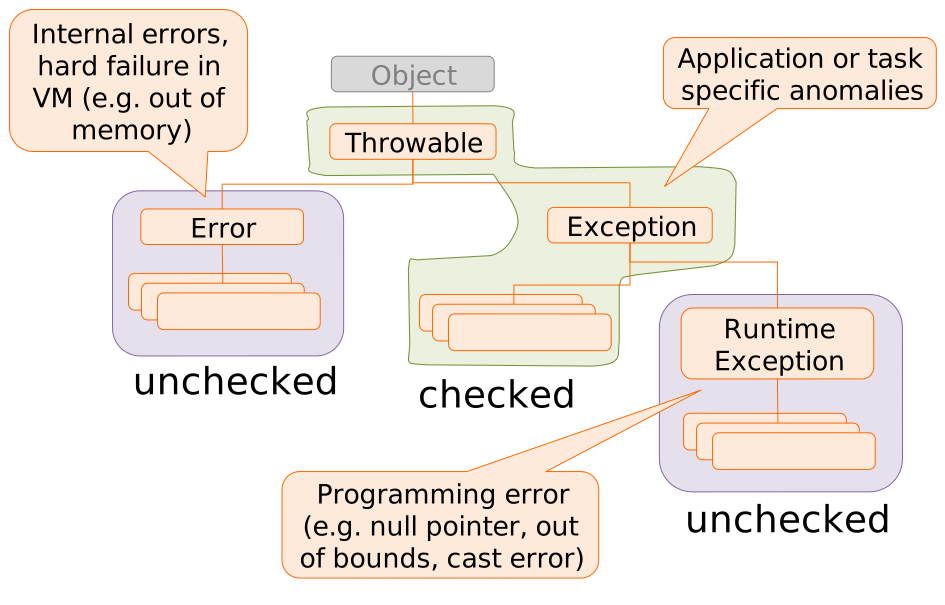
Exception classes examples
ErrorOutOfMemoryError
ExceptionClassNotFoundExceptionInstantiationExceptionIOExceptionInterruptedException
RuntimeExceptionNullPointerExceptionClassCastException
Application specific exceptions represent anomalies specific for the application. Usually such exceptions extend Exception. They can be caught separately from the predefined ones, thus allowing finer-grained control than using just Exception.
In general it is important to used specific application specific exceptions that contain explanatory messages. Exceptions are like stones, when they hit you, they immediately matter because they exists and are thrown, then for their meaning and message.
8.4.3 Unchecked and loops
String[] strings = {"1","2","III","4","V","6"};
int sum = 0;
for(String s : strings) {
1  sum += Integer.parseInt(s);
}
System.out.println("Sum: " + sum);- 1
-
At runtime generates a
NumberFormatException: For input string: "III"
String[] strings = {"1","2","III","4","V","6"};
try{
  int sum = 0;
  for(String s : strings) {
    sum += Integer.parseInt(s);
  }
  System.out.println("Sum: " + sum);
}catch(Exception e){
  System.err.println("Error!");
}String[] strings = {"1","2","III","4","V","6"};
int sum = 0;
for(String s : strings) {
try{
sum += Integer.parseInt(s);
}catch(NumberFormatException e){
System.err.println("Wrong: "+s);
}
}
System.out.println("Sum: " + sum);8.5 Multiple exception
8.5.1 Nested try
Try/catch blocks can be nested, e.g. because error handlers may generate new exceptions.
try{
    /* Do something */
}catch(…){
      try{ /* Log on file */ }
      catch(…){ /* Ignore */ }
}
Unchecked and loop
sum = 0;
for(String s : strings) {
  try {
    sum += Integer.parseInt(s);
  }catch(NumberFormatException nfe) {
    try {
      sum += parseRoman(s);
    }catch(NumberFormatException re) {
      System.err.println("Wrong " + s);
} } }
System.out.println("Sum: " + sum);
8.5.2 Multiple catch
Capturing different types of exception is possible with different catch blocks attached to the same try
try {
 ...
}
catch(StackEmpty se) {
    // here stack errors are handled
}
catch(IOException ioe) {
  // here all other IO problems are handled
}
The matching rules state that only one handler is executed, the first one matching the thrown exception. A catch matches an exception if it is instanceof the catch’s exception class.
As a consequence, catch blocks must be ordered by their “generality”: from the most specific (derived classes) to the most general (base classes). Placing the more general first would obscure the more specific, making them unreachable and producing a compilation error.
For instance if open and close can generate a FileError and read can generate a IOError.
System.out.print("Begin");

File f = new File(“foo.txt”);
try{
  f.open();
  f.read();
  f.close();
}catch(FileError fe){
  System.out.print(“File err”);
}catch(IOError ioe){
  System.out.print(“I/O err”);
}

System.out.print("End");
If close fails, “File error” is printed and eventually program terminates with “End”
If read fails, “I/O error” is printed and eventually program terminates with “End”
8.6 finally clause
The keyword finally introduces a code block that is executed in any case
- No exception
- Caught exception
- Uncaught exception, both checked and unchecked
It does not work in case of System.exit() which instantly terminates the execution.
Some objects consume OS resources, such as input/output streams, db connections, etc. Such resources are limited, e.g., a program can open only a given number of files at once. Therefore those objects should be closed as soon as possible to free shared and limited resources.
A typical example is a file connection used for reading:
String readFile(String path) throws IOException{
  FileReader fr = new FileReader(path);

1  int ch = fr.read();
  // …
  fr.close();
  return String.valueOf(ch);
}- 1
-
in case of exception in
read()the method terminates without executing theclose()
A possible alternative is
String readFile(String path) throws IOException {
  try {
    FileReader fr = new FileReader(path);
    int ch = fr.read();
    // …
    fr.close();
    return String.valueOf(ch);
  } catch(IOException e){
    fr.close();
    throw e;
  }
}
This code is more complex and does not close in case of other exceptions. Therefore the right solution is to use a finally clause:
String readFile(String path) throws IOException {
  try {
    FileReader fr = new FileReader(path);
    int ch = fr.read();
    // …
    fr.close();
    return String.valueOf(ch);
  }finally {
1    if(fr!=null) fr.close();
    throw e;
  }
}- 1
- the file is close in any possible case
The try-with-resource construct has been defined (in Java 7) to make the latter syntax simpler. It is based on the AutoCloaseable interface that is defined as follow
public interface AutoCloseable{
  void close();
}
The AutoCloaseable interface serves the double function of common behavior and flagging to enable the automatic closing of resources.
The general syntax with try-with-resource construct is:
try( AutoCloseableType resource = new AutoCloseableType() ){
    // ...
}
The AutoCloaseableType is any class that implements the Autocloseable interface. The compiler automatically adds a finally block that closes the resource.
Therfore, the above code then can be re-written as:
String readFile(String path) throws IOException {
  try(FileReader fr = new FileReader(path)){
      int ch = fr.read();
      // ...
      fr.close();
      return String.valueOf(ch);
  }
}
Since FileReader implements Autocloseable the code is safe and the resource will be automatically released whatever it happens.
8.7 Defensive Programming
Defensive programming is a proactive strategy for making software more robust. It consists in anticipating possible issues and adding safeguards to prevent or clearly signal failures. In fact most of software bugs stem from edge cases that were not considered by tge developers. Defensive coding reduces surprises.
8.7.1 Fail Fast
Some people recommend making your software robust by working around problems automatically.
This results in the software “failing slowly.” The program continues working right after an error but fails in strange ways later on.
A system that fails fast does exactly the opposite: when a problem occurs, it fails imme- diately and visibly. Failing fast is a nonintuitive technique: “failing immediately and visibly” sounds like it would make your software more fragile, but it actually makes it more robust. Bugs are easier to find and fix, so fewer go into production.
– Shore (2004)
The general rule when an anomaly is detected is to throw and exception. The alternative, i.e., returning some default value, while it allows the program continue, it may lead to malfunctions that that much more difficult to diagnose.
Most standard library methods use Objects.assertNotNull() to sanitize the input parameters and throw an exception in case they are null
8.8 Wrap-up
- Exceptions provide a mechanism to manage anomalies and errors
- Allow separating “nominal case” code from exceptional case code
- Decouple anomaly detection from anomaly handling
- They are used pervasively throughout the standard Java library
- Exceptions are classes extending the
Throwablebase class - Inheritance is used to classify exceptions
Errorrepresent internal JVM errorsRuntimeExceptionrepresent programming error detected by JVMExceptionrepresent the usual application-level error
- Exception must be dispatched by
- Catching them with
try{ }catch{ } - Relaying with
throws - Catching and re-throwing
- Catching them with
- Unchecked exception can avoid mandatory dispatching ans simplify code
- All exceptions extending
ErrorandRuntimeExceptionare unchecked
- All exceptions extending
- The
finallyblocks can be used to execute some code in any possible case- the
try-with-resourceconstruct makes is easier to use them
- the